milosev.com
  • Home
    • List all categories
    • Sitemap
  • Downloads
    • WebSphere
    • Hitachi902
    • Hospital
    • Kryptonite
    • OCR
    • APK
  • About me
    • Gallery
      • Italy2022
      • Côte d'Azur 2024
    • Curriculum vitae
      • Resume
      • Lebenslauf
    • Social networks
      • Facebook
      • Twitter
      • LinkedIn
      • Xing
      • GitHub
      • Google Maps
      • Sports tracker
    • Adventures planning
  1. You are here:  
  2. Home

Add firewall rule

Details
Written by: Stanko Milosev
Category: SQL
Published: 30 November -0001
Last Updated: 03 March 2013
Hits: 6505

If you are receiving error like:

Failed to add rule 'xxx.xxx.xxx.xxx to xxx.xxx.xxx.xxx' to firewall. Please add it manually.

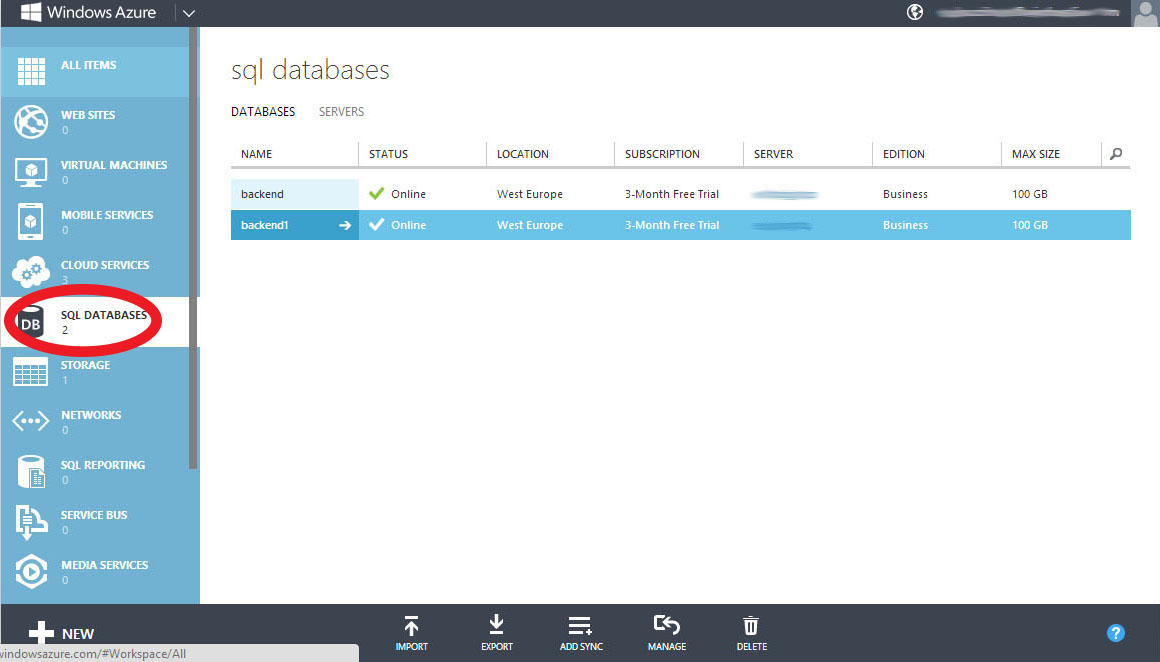
Then first go to SQL databases, like on the picture:
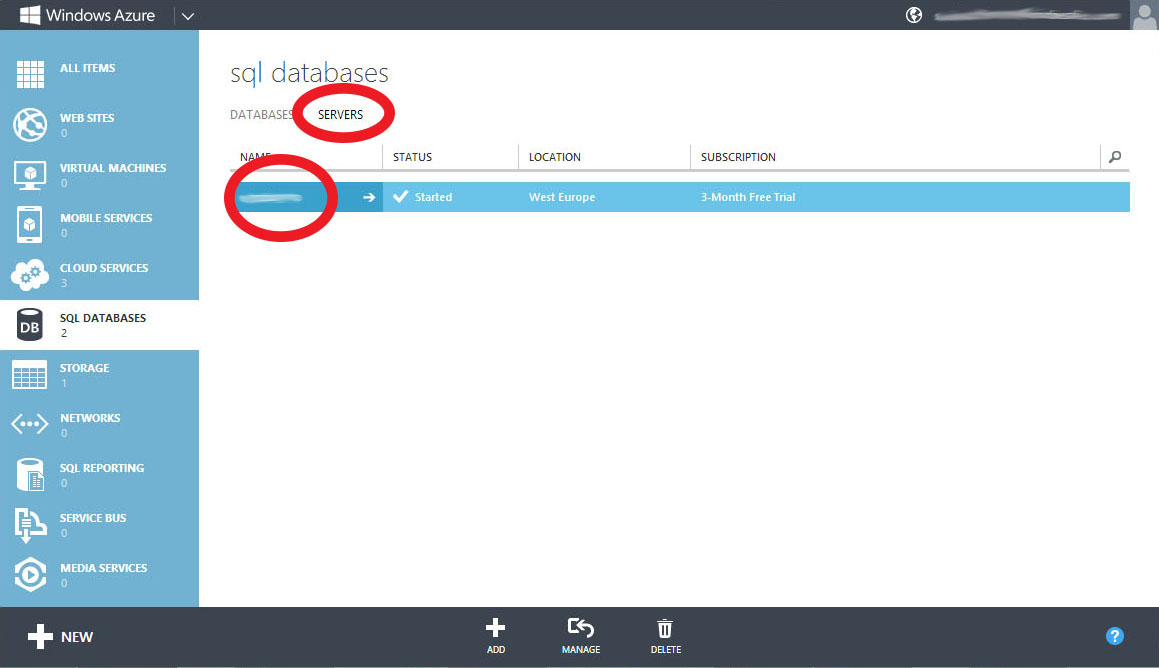
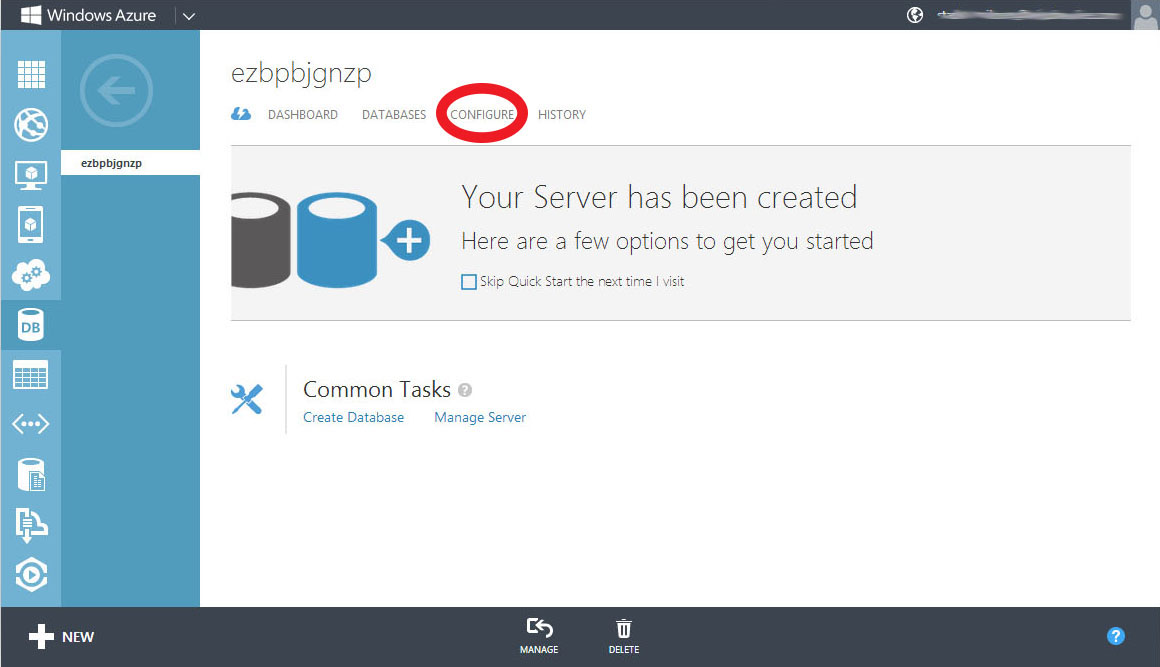
After go to servers, and click on the server which you want to configure:
Then click configure:
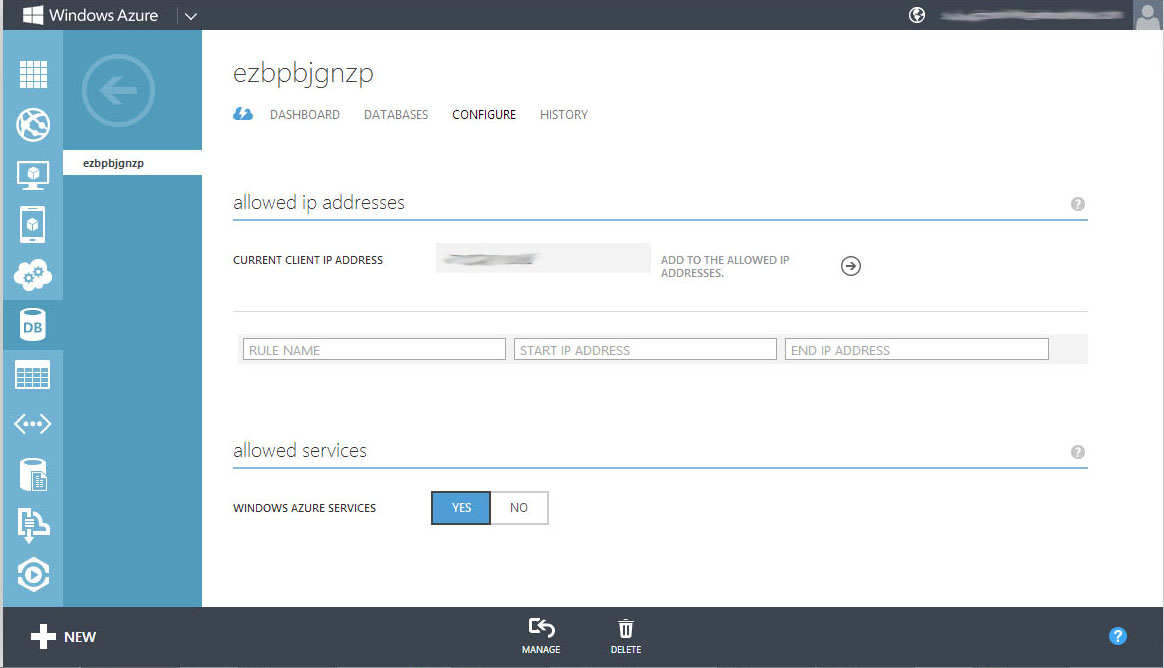
And here you can add your rule:
Debug ASP.NET on IIS

Details
Written by: Stanko Milosev
Category: ASP.NET
Published: 30 December 2019
Last Updated: 06 April 2022
Hits: 3156
Here I already explained how to debug IIS express and here I explained how to add web site to IIS.

Now I am will give little bit more detailed explanation how to debug ASP.NET on IIS.

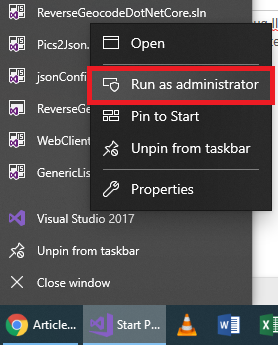
First start Visual Studio as administrator:

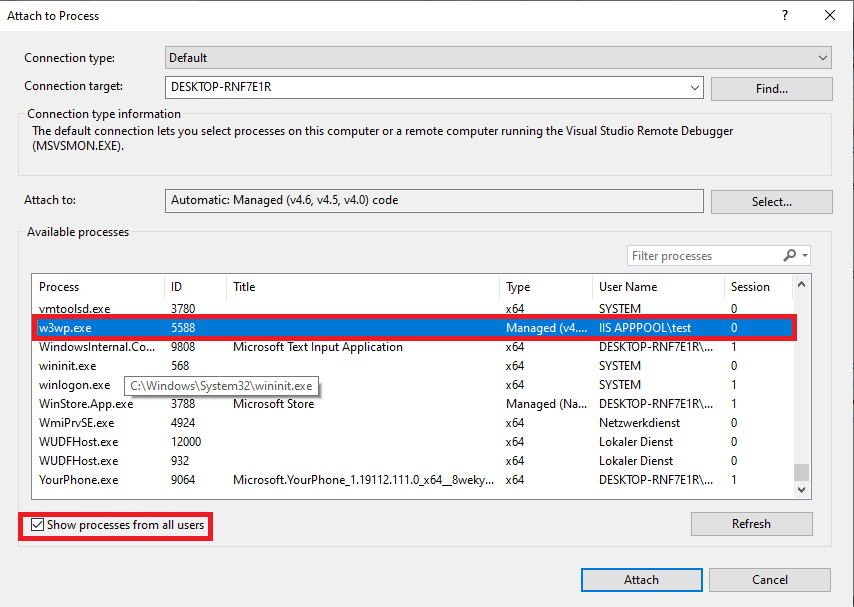
Set breakpoints and attach to process w3wp.exe:
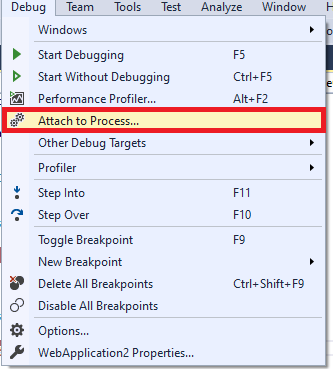
If you don't see w3wp.exe then either refresh browser, or open your application in browser, and click refresh in "Attach to process" window.

String as a null

Details
Written by: Stanko Milosev
Category: ASP.NET
Published: 31 October 2013
Last Updated: 06 April 2022
Hits: 6113

In this article I have a bug :) Because I had a model like:

public String ReportSuccessToAddress { get; set; }

then in controller I had:

xmlReportSuccessCcAddress.Descendants("Value").Single().Value = startReportModel[i].ReportSuccessCcAddress;

In case that ReportSuccessCcAddress is null this line will fail. To automatically change null to empty string, in your model add annotation like:

[DisplayFormat(ConvertEmptyStringToNull = false)]
public String ReportSuccessToAddress { get; set; }

E - mail regular expression

Details
Written by: Stanko Milosev
Category: ASP.NET
Published: 21 October 2013
Last Updated: 05 October 2020
Hits: 6791
  • regular expressions

In your model, if you want to have e - mail validation, if user entered valid e - mail, you can use following regular expression:

[RegularExpression("^(([a-zA-Z0-9_\\-\\.]+)@([a-zA-Z0-9_\\-\\.]+)\\.([a-zA-Z]{2,5}){1,25})+([;.](([a-zA-Z0-9_\\-\\.]+)@([a-zA-Z0-9_\\-\\.]+)\\.([a-zA-Z]{2,5}){1,25})+)*$",
            ErrorMessage = "You must enter a valid email address for send Error Mail address. Multiple mail addresses must be separated with semicolons (no spaces)!")]

One example of the model is:

public class DistributionListsEditModel
{
	[DataType(DataType.Text)]
	public String Name { get; set; }

	[DataType(DataType.EmailAddress)]
	[RegularExpression("^(([a-zA-Z0-9_\\-\\.]+)@([a-zA-Z0-9_\\-\\.]+)\\.([a-zA-Z]{2,5}){1,25})+([;|.](([a-zA-Z0-9_\\-\\.]+)@([a-zA-Z0-9_\\-\\.]+)\\.([a-zA-Z]{2,5}){1,25})+)*$",
		ErrorMessage = "You must enter a valid email address for send Success Mail address. Multiple mail addresses must be separated with semicolons (no spaces)!")]
	public String ReportSuccessToAddress { get; set; }

	[DataType(DataType.EmailAddress)]
	[RegularExpression("^(([a-zA-Z0-9_\\-\\.]+)@([a-zA-Z0-9_\\-\\.]+)\\.([a-zA-Z]{2,5}){1,25})+([;.](([a-zA-Z0-9_\\-\\.]+)@([a-zA-Z0-9_\\-\\.]+)\\.([a-zA-Z]{2,5}){1,25})+)*$",
		ErrorMessage = "You must enter a valid email address for send Error Mail address. Multiple mail addresses must be separated with semicolons (no spaces)!")]
	public String ReportErrorToAddress { get; set; }

	[DataType(DataType.EmailAddress)]
	[RegularExpression("^(([a-zA-Z0-9_\\-\\.]+)@([a-zA-Z0-9_\\-\\.]+)\\.([a-zA-Z]{2,5}){1,25})+([;.](([a-zA-Z0-9_\\-\\.]+)@([a-zA-Z0-9_\\-\\.]+)\\.([a-zA-Z]{2,5}){1,25})+)*$",
		ErrorMessage = "You must enter a valid email address for send Success CC Mail address. Multiple mail addresses must be separated with semicolons (no spaces)!")]
	public String ReportSuccessCcAddress { get; set; }

	[DataType(DataType.EmailAddress)]
	[RegularExpression("^(([a-zA-Z0-9_\\-\\.]+)@([a-zA-Z0-9_\\-\\.]+)\\.([a-zA-Z]{2,5}){1,25})+([;.](([a-zA-Z0-9_\\-\\.]+)@([a-zA-Z0-9_\\-\\.]+)\\.([a-zA-Z]{2,5}){1,25})+)*$",
		ErrorMessage = "You must enter a valid email address for send Error CC Mail address. Multiple mail addresses must be separated with semicolons (no spaces)!")]
	public String ReportErrorCcAddress { get; set; }
}
  1. Composite primary key
  2. Debug IIS express
  3. Debug JavaScript in Visual Studio 2010
  4. Playing with XML

Subcategories

C#

Azure

ASP.NET

JavaScript

Software Development Philosophy

MS SQL

IBM WebSphere MQ

MySQL

Joomla

Delphi

PHP

Windows

Life

Lazarus

Downloads

Android

CSS

Chrome

HTML

Linux

Eclipse

Page 42 of 168

  • 37
  • 38
  • 39
  • 40
  • 41
  • 42
  • 43
  • 44
  • 45
  • 46