
- Details
- Written by: Stanko Milosev
- Category: ASP.NET
- Hits: 7428
In your model, if you want to have e - mail validation, if user entered valid e - mail, you can use following regular expression:
[RegularExpression("^(([a-zA-Z0-9_\\-\\.]+)@([a-zA-Z0-9_\\-\\.]+)\\.([a-zA-Z]{2,5}){1,25})+([;.](([a-zA-Z0-9_\\-\\.]+)@([a-zA-Z0-9_\\-\\.]+)\\.([a-zA-Z]{2,5}){1,25})+)*$",
            ErrorMessage = "You must enter a valid email address for send Error Mail address. Multiple mail addresses must be separated with semicolons (no spaces)!")]
One example of the model is:
public class DistributionListsEditModel
{
	[DataType(DataType.Text)]
	public String Name { get; set; }

	[DataType(DataType.EmailAddress)]
	[RegularExpression("^(([a-zA-Z0-9_\\-\\.]+)@([a-zA-Z0-9_\\-\\.]+)\\.([a-zA-Z]{2,5}){1,25})+([;|.](([a-zA-Z0-9_\\-\\.]+)@([a-zA-Z0-9_\\-\\.]+)\\.([a-zA-Z]{2,5}){1,25})+)*$",
		ErrorMessage = "You must enter a valid email address for send Success Mail address. Multiple mail addresses must be separated with semicolons (no spaces)!")]
	public String ReportSuccessToAddress { get; set; }

	[DataType(DataType.EmailAddress)]
	[RegularExpression("^(([a-zA-Z0-9_\\-\\.]+)@([a-zA-Z0-9_\\-\\.]+)\\.([a-zA-Z]{2,5}){1,25})+([;.](([a-zA-Z0-9_\\-\\.]+)@([a-zA-Z0-9_\\-\\.]+)\\.([a-zA-Z]{2,5}){1,25})+)*$",
		ErrorMessage = "You must enter a valid email address for send Error Mail address. Multiple mail addresses must be separated with semicolons (no spaces)!")]
	public String ReportErrorToAddress { get; set; }

	[DataType(DataType.EmailAddress)]
	[RegularExpression("^(([a-zA-Z0-9_\\-\\.]+)@([a-zA-Z0-9_\\-\\.]+)\\.([a-zA-Z]{2,5}){1,25})+([;.](([a-zA-Z0-9_\\-\\.]+)@([a-zA-Z0-9_\\-\\.]+)\\.([a-zA-Z]{2,5}){1,25})+)*$",
		ErrorMessage = "You must enter a valid email address for send Success CC Mail address. Multiple mail addresses must be separated with semicolons (no spaces)!")]
	public String ReportSuccessCcAddress { get; set; }

	[DataType(DataType.EmailAddress)]
	[RegularExpression("^(([a-zA-Z0-9_\\-\\.]+)@([a-zA-Z0-9_\\-\\.]+)\\.([a-zA-Z]{2,5}){1,25})+([;.](([a-zA-Z0-9_\\-\\.]+)@([a-zA-Z0-9_\\-\\.]+)\\.([a-zA-Z]{2,5}){1,25})+)*$",
		ErrorMessage = "You must enter a valid email address for send Error CC Mail address. Multiple mail addresses must be separated with semicolons (no spaces)!")]
	public String ReportErrorCcAddress { get; set; }
}
- Details
- Written by: Stanko Milosev
- Category: ASP.NET
- Hits: 12996
Definition:
Primary key is such an attribute which uniquely identify the record. Some times we needs more then one keys to find the specific record such scenario in which more than one keys are used to find the specific data is called the composite primary key.
From here.
Error:
Unable to determine composite primary key ordering for type 'MvcApplication7.Models.MyMaster'. Use the ColumnAttribute or the HasKey method to specify an order for composite primary keys.
Solution:
public class MyMaster
{
	[Key]
	[Column(Order = 0)]
	public int myField1 { get; set; }
	[Key]
	[Column(Order = 1)]
	public int myField2 { get; set; }
	public string Username { get; set; }
}
- Details
- Written by: Stanko Milosev
- Category: ASP.NET
- Hits: 8115
Just start your application without debugging:
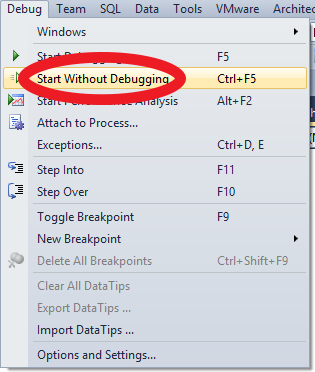
Then just attach to process as you debug normally IIS (w3w9.exe)