
- Details
- Written by: Stanko Milosev
- Category: Android
- Hits: 4908
For example, read version from JSON file. In build.gradle, in my case it is in: /app/build.gradle write something like:
def computeVersionName() {
    def f1 = new File("app/src/main/assets/version.json");
    def json = new JsonSlurper().parseText(f1.text)

    assert json instanceof Map
    return json.version
}

android {
    compileSdkVersion 22
    buildToolsVersion "22.0.1"
    defaultConfig {
        applicationId 'myId'
        minSdkVersion 16
        targetSdkVersion 22
        versionCode 2
        versionName computeVersionName()
    }
    buildTypes {
        release {
            minifyEnabled false
            proguardFiles getDefaultProguardFile('proguard-android.txt'), 'proguard-rules.pro'
        }
    }
    productFlavors {
    }
}
Notice:
versionName computeVersionName()
- Details
- Written by: Stanko Milosev
- Category: Android
- Hits: 5956
It seems that androids WebView doesn't like video tag.
Here is Android code which worked for me:
        mWebView.setWebViewClient(new WebViewClient() {
            // autoplay when finished loading via javascript injection
            public void onPageFinished(WebView view, String url) {
                mWebView.loadUrl("javascript:(function() { document.getElementsByTagName('video')[0].play(); })()");
            }
        });

        mWebView.setWebChromeClient(new WebChromeClient());
Where WebChromeClient we need to handle javascript methods, and it seems that autoplay in WebView doesn't work.
Also, mWebView is: private WebView mWebView; (I took example of WebView based application)
HTML code looks like:
<video autoplay loop>
	<source src="http://www.w3schools.com/html/mov_bbb.mp4" type="video/mp4">
</video>
- Details
- Written by: Stanko Milosev
- Category: Android
- Hits: 5220
To debug your web application in Android in Chrome write:
chrome://inspect/#devices
and click inspect:
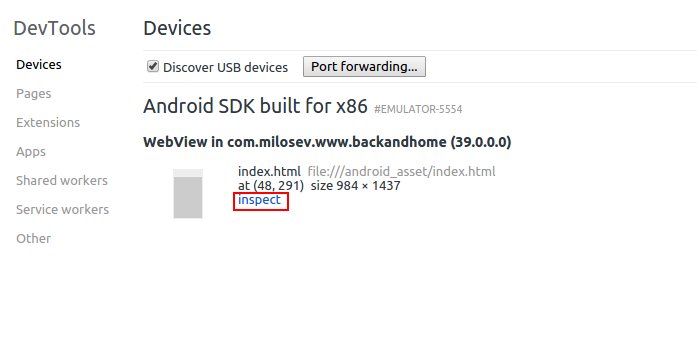
Before that in Android code write:
if (Build.VERSION.SDK_INT >= Build.VERSION_CODES.KITKAT) {
WebView.setWebContentsDebuggingEnabled(true);
}
- Details
- Written by: Stanko Milosev
- Category: Android
- Hits: 5029
Here you can see an example of creating WebView for Android. Problem which I had was to load a local file. Simple answer is like this:
mWebView.loadUrl("file:///android_asset/touchEnd/index.html");
Where android_asset is actually assets folder in Android project. To add assets to the Android project, choose view to Android, right click on the app -> New -> Folder -> Assets folder:
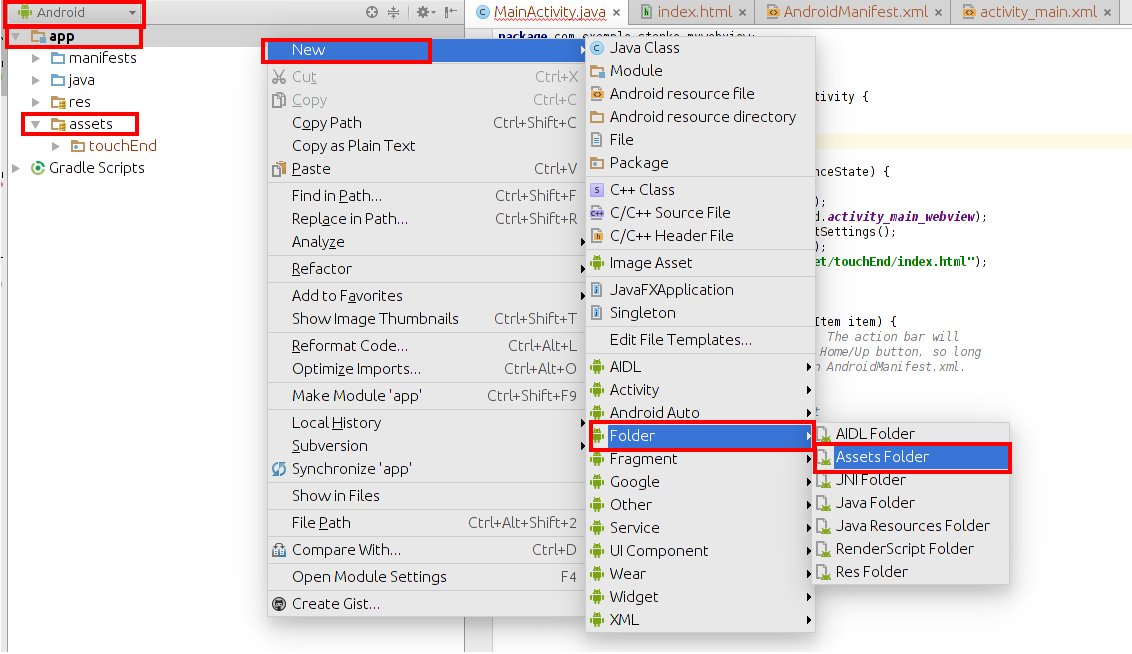
Now the whole code can look something like this:
    @Override
    protected void onCreate(Bundle savedInstanceState) {
        super.onCreate(savedInstanceState);
        setContentView(R.layout.activity_main);
        mWebView = (WebView) findViewById(R.id.activity_main_webview);
        WebSettings webSettings = mWebView.getSettings();
        webSettings.setJavaScriptEnabled(true);
        mWebView.loadUrl("file:///android_asset/touchEnd/index.html");
    }