milosev.com
  • Home
    • List all categories
    • Sitemap
  • Downloads
    • WebSphere
    • Hitachi902
    • Hospital
    • Kryptonite
    • OCR
    • APK
  • About me
    • Gallery
      • Italy2022
      • Côte d'Azur 2024
    • Curriculum vitae
      • Resume
      • Lebenslauf
    • Social networks
      • Facebook
      • Twitter
      • LinkedIn
      • Xing
      • GitHub
      • Google Maps
      • Sports tracker
    • Adventures planning
  1. You are here:  
  2. Home
  3. C#

Simple thread

Details
Written by: Stanko Milosev
Category: WPF
Published: 04 May 2014
Last Updated: 04 May 2014
Hits: 4839

Today I was playing with threads.

I have no much to say about it, except the code.

Creating new thread is very simple:

Thread th = new Thread(MyThreadExample);
th.Start();

Method MyThreadExample looks like this:

while (i < 10000000000000)
{
	i++;

	Dispatcher.CurrentDispatcher.Invoke(DispatcherPriority.Background, new Action(
		() =>
		{
			DisplayCount = i.ToString();
			OnPropertyChanged(() => this.DisplayCount);
			System.Threading.Thread.Sleep(10);
		}));
}

Example you can download from here.

Display realtime log

Details
Written by: Stanko Milosev
Category: WPF
Published: 01 May 2014
Last Updated: 05 April 2022
Hits: 4894

If you want, for example, to show in a text box loop iterations in a real time, then you have to use something like:

Dispatcher.CurrentDispatcher.Invoke(DispatcherPriority.Background, new Action(
  () =>
	{
	  DisplayCount = i.ToString();
	  OnPropertyChanged(() => this.DisplayCount);
	  System.Threading.Thread.Sleep(10);
	}));

Where DiplayCount is property to which TextBox is binded. Here I explained how to use INotifyPropertyChanged, and from here you can download example.
Open XAML without designer

Details
Written by: Stanko Milosev
Category: WPF
Published: 09 April 2014
Last Updated: 09 April 2014
Hits: 5774

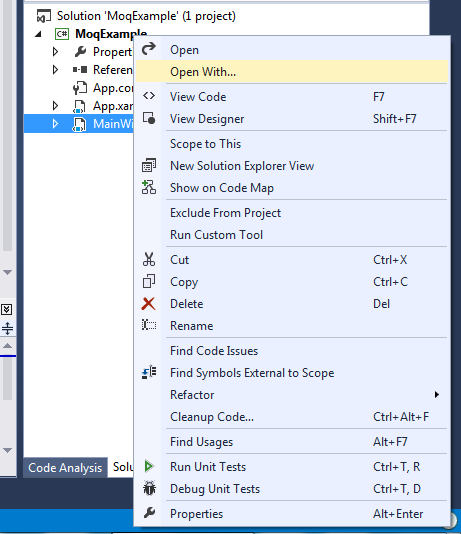
Right click on the XAML file, and click "Open With..":

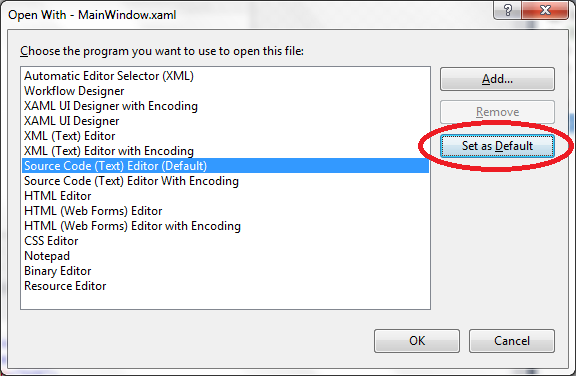
Choose Source Code (Text) Editor, and click "Set as Default":

Next time when you double click on XAML file, it will be opened without design, and faster.

Thanks to colleagues from ISE

Playing with triggers

Details
Written by: Stanko Milosev
Category: WPF
Published: 08 April 2014
Last Updated: 06 April 2022
Hits: 5351

First create dictionary as I explained here.
In my case I've created TriggersDictionary.xaml, so my main window XAML looks like this:

<Window x:Class="PlayingWithResource.MainWindow"
        xmlns="http://schemas.microsoft.com/winfx/2006/xaml/presentation"
        xmlns:x="http://schemas.microsoft.com/winfx/2006/xaml"
        Title="MainWindow" Height="350" Width="525">
    
        <Window.Resources>
            <ResourceDictionary>
                <ResourceDictionary.MergedDictionaries>
                    <ResourceDictionary
                      Source= "TriggersDictionary.xaml">
                    </ResourceDictionary>
                </ResourceDictionary.MergedDictionaries>
            </ResourceDictionary>
        </Window.Resources>
        <Grid>

        <Rectangle Style="{StaticResource styleWithTrigger}"></Rectangle>

    </Grid>
</Window>


My style (TriggersDictionary.xaml)

<ResourceDictionary xmlns="http://schemas.microsoft.com/winfx/2006/xaml/presentation"
                    xmlns:x="http://schemas.microsoft.com/winfx/2006/xaml">

    <Style x:Key="styleWithTrigger" TargetType="Rectangle">
        <Setter Property="Fill" Value="LightGreen" />
        <Style.Triggers>
            <Trigger Property="IsMouseOver" Value="True">
                <Setter Property="Fill" Value="Red" />
            </Trigger>
        </Style.Triggers>
    </Style>

</ResourceDictionary>


Here you can see property - this is event which will be executed as well as target type (in my case rectangle)
Example project you can download from here, and this article I wrote using this page.

----

2014-06-16 Update Properties which are supported for trigger, for rectangle, for example you can see here.

  1. Dispatcher processing has been suspended, but messages are still being processed.
  2. Update binding
  3. More about binding
  4. Autofac another example

Subcategories

WPF

Beginning

Code snippets

NUnit

LINQ

Windows Forms

Page 27 of 39

  • 22
  • 23
  • 24
  • 25
  • 26
  • 27
  • 28
  • 29
  • 30
  • 31