
- Details
- Written by: Stanko Milosev
- Category: C#
- Hits: 4566
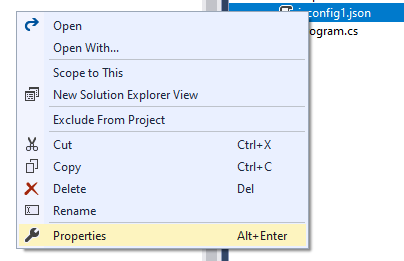
 Right click on file, and click properties:
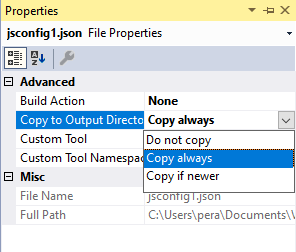
 Set "Copy to Output Directory", in my case I have set it to "Copy always":
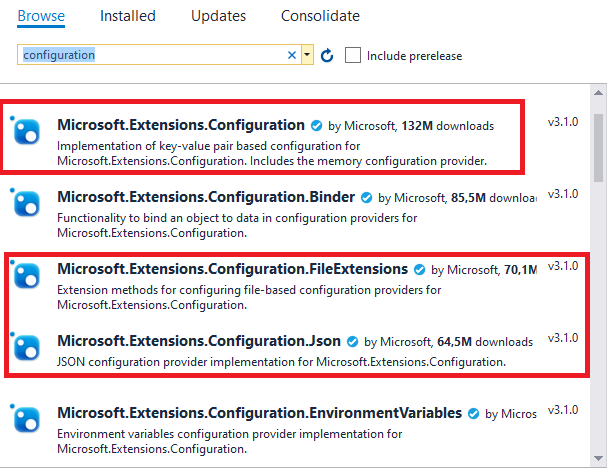
 Add following references:
Microsoft.Extensions.Configuration
Add following references:
Microsoft.Extensions.Configuration
Microsoft.Extensions.Configuration.FileExtensions
Microsoft.Extensions.Configuration.Json
In my case I have added them with NuGet:
 Or you can add them via console:
dotnet add package Microsoft.Extensions.Configuration
Or you can add them via console:
dotnet add package Microsoft.Extensions.Configuration
dotnet add package Microsoft.Extensions.Configuration.FileExtensions
dotnet add package Microsoft.Extensions.Configuration.Json In my case my JSON configuration file looks like this:
{
"apiKey":  "myApiKey"
}
Code:
using Microsoft.Extensions.Configuration;
using System;
using System.IO;

namespace jsonConfigurationFile
{
  class Program
  {
    static void Main(string[] args)
    {
      IConfiguration config = new ConfigurationBuilder()
          .AddJsonFile("jsconfig1.json", true, true)
          .Build();

      Console.WriteLine($" Key: { config["apiKey"] }");
      Console.ReadKey();
    }
  }
}
- Details
- Written by: Stanko Milosev
- Category: C#
- Hits: 4494
using (JsonDocument document = JsonDocument.Parse(doc))
{
	Console.WriteLine($"plus_code: {document.RootElement.GetProperty("plus_code")}");
	foreach (JsonElement element in document.RootElement.GetProperty("results").EnumerateArray())
	{
		foreach (JsonElement addComp in element.GetProperty("address_components").EnumerateArray())
		{
			Console.WriteLine($"long_name: {addComp.GetProperty("long_name")}, short_name: {addComp.GetProperty("short_name")}");
			foreach (JsonElement type in addComp.GetProperty("types").EnumerateArray())
			{
				Console.WriteLine($"type: {type.ToString()}");
			}
		}
	}
}
I have decided to go further using this (Newtonsoft.Json) solution. Just with one line of code:
JObject myJObject = JObject.Parse(doc);I have basically extracted everything I need.
- Details
- Written by: Stanko Milosev
- Category: C#
- Hits: 4074
  class IDName
  {
    public Guid ID;
    public string Name;
  }

  class FirstIDName: IDName { }
  class SecondIDName : IDName { }
Then I need one method to fill those classes:
public static void AddToIDName<T>(List<T> iDNameList, string name) where T : IDName, new()
{
  iDNameList.Add(new T
  {
	ID = Guid.NewGuid(),
	Name = name
  });
}
Here notice constraint "where T : IDName, new()". I needed constraint new because of line: "iDNameList.Add(new T"
Whole example:
using System;
using System.Collections.Generic;

namespace GenericList
{
  class Program
  {
    static void Main(string[] args)
    {
      List<FirstIDName> firstIDNames = new List<FirstIDName>();
      List<SecondIDName> secondIDNames = new List<SecondIDName>();

      AddToIDName(firstIDNames, "firstIDNameTestOne");
      AddToIDName(firstIDNames, "firstIDNameTestTwo");

      AddToIDName(secondIDNames, "secondIDNameTestOne");
      AddToIDName(secondIDNames, "secondIDNameTestTwo");
      AddToIDName(secondIDNames, "secondIDNameTestThree");

      Console.WriteLine("FirstIDName");
      foreach (FirstIDName firstIDName in firstIDNames)
      {
        Console.WriteLine($"id: {firstIDName.ID}, name: {firstIDName.Name}");
      }

      Console.WriteLine("SecondIDName");
      foreach (SecondIDName secondIDName in secondIDNames)
      {
        Console.WriteLine($"id: {secondIDName.ID}, name: {secondIDName.Name}");
      }

      Console.WriteLine("");
      Console.WriteLine("The end");
      Console.ReadKey();
    }

    public static void AddToIDName<T>(List<T> iDNameList, string name) where T : IDName, new()
    {
      iDNameList.Add(new T
      {
        ID = Guid.NewGuid(),
        Name = name
      });
    }
  }
}
- Details
- Written by: Stanko Milosev
- Category: C#
- Hits: 4690
using System;
using System.Collections;
using System.Collections.Generic;

namespace GetEnumerator
{
    class Program
    {
        static void Main(string[] args)
        {
            GetEnumeratorDict getEnumerator = new GetEnumeratorDict();

            foreach (KeyValuePair<int, string> getEnumeratorItem in getEnumerator)
            {
                Console.WriteLine($"getEnumeratorItem: {getEnumeratorItem}");
            }

            Console.WriteLine("Press any key ");
            Console.ReadKey();
        }
    }

    class GetEnumeratorDict : IEnumerable
    {
        readonly Dictionary<int, string> m_internalDictionary = new Dictionary<int, string>();

        public GetEnumeratorDict()
        {
            m_internalDictionary[1] = "test";
        }

        IEnumerator IEnumerable.GetEnumerator()
        {
            return m_internalDictionary.GetEnumerator();
        }

    }
}
In code line:
IEnumerator IEnumerable.GetEnumerator()
{
	return m_internalDictionary.GetEnumerator();
}
You can implement your own OrderBy, something like I already explained hier. Difference between IEnumerator and IEnumerable you can read hier