
- Details
- Written by: Stanko Milosev
- Category: C#
- Hits: 2297
using System;
using System.Collections.Generic;
using System.Windows.Forms;

namespace UltraGridHierarchical
{
    public partial class Form1 : Form
    {
        public Form1()
        {
            InitializeComponent();
        }

        private void button1_Click(object sender, EventArgs e)
        {
            List<MyChild> stankosKids = new List<MyChild>();
            stankosKids.Add(new MyChild {Name = "Velimir", Gender = "Male"});
            stankosKids.Add(new MyChild {Name = "Hilda", Gender = "Female"});

            List<MyChild> arnoldsKids = new List<MyChild>();
            arnoldsKids.Add(new MyChild {Name = "Thomas", Gender = "Male"});
            arnoldsKids.Add(new MyChild {Name = "Sabrina", Gender = "Female"});

            List<MyChild> chucksKids = new List<MyChild>();
            chucksKids.Add(new MyChild {Name = "Bruce", Gender = "Male"});
            chucksKids.Add(new MyChild {Name = "Lee", Gender = "Female"});

            List<MyParent> list = new List<MyParent>();
            list.Add(new MyParent {ID = 1, FirstName = "Stanko", LastName = "Milosev", Address = "Herseler strasse 8", MyKids = stankosKids});
            list.Add(new MyParent {ID = 2, FirstName = "Arnold", LastName = "Schwarzeneger", Address = "Whitehouse 1", MyKids = arnoldsKids});
            list.Add(new MyParent {ID = 3, FirstName = "Chuck", LastName = "Norris", Address = "Las Vegas", MyKids = chucksKids});

            ultraGrid1.SetDataBinding(list, null);
        }

        public class MyParent
        {
            public int ID { get; set; }
            public string FirstName { get; set; }
            public string LastName { get; set; }
            public string Address { get; set; }

            public List<MyChild> MyKids { get; set; }
        }

        public class MyChild
        {
            public string Name { get; set; }
            public string Gender { get; set; }
        }
    }
}
Source code.
- Details
- Written by: Stanko Milosev
- Category: C#
- Hits: 7341
<?xml version="1.0" encoding="utf-8" ?>
<configuration>

  <configSections>
    <section name="links" type="System.Configuration.NameValueSectionHandler">
    </section>
  </configSections>

  <links>
      <add key="link1" value="http://www.milosev.com/csharp/" />
      <add key="link2" value="http://milosev.com/asp-net-mvc-3" />
  </links>

  <appSettings>
      <add key="homePage" value="http://milosev.com/" />
  </appSettings>

    <startup>
        <supportedRuntime version="v4.0" sku=".NETFramework,Version=v4.6.1" />
    </startup>
</configuration>
.NET code:
using System;
using System.Collections.Specialized;
using System.Configuration;

namespace CustomConfig
{
    class Program
    {
        static void Main(string[] args)
        {
            NameValueCollection links = ConfigurationManager.GetSection("links") as NameValueCollection;
            string homePage = ConfigurationManager.AppSettings.Get("homePage");

            Console.WriteLine("Home page: " + homePage);

            foreach (string link in links)
            {
                Console.WriteLine("Link: " + links.Get(link));
            }

            Console.WriteLine("Press any key...");
            Console.ReadKey();
        }
    }
}
In reference list you will need to add System.Configuration.
POI:
  <configSections>
    <section name="links" type="System.Configuration.NameValueSectionHandler">
    </section>
  </configSections>
Here is more about configSection.
Also notice line:
Console.WriteLine("Link: " + links.Get(link));
- Details
- Written by: Stanko Milosev
- Category: C#
- Hits: 7338
One my example of interpolated string (taken from here):
string name = "stanko";
DateTime hours = DateTime.Now;
Console.WriteLine($"Name = {name}, hours = {hours:hh}");
Console.ReadKey();
Composite string:
string name = "stanko";
Console.WriteLine("Name = {0}, hours = {1:hh}", name, DateTime.Now);
Console.ReadKey();
According to Microsoft:
Interpolated string are easier to understand than a composite format string.
- Details
- Written by: Stanko Milosev
- Category: C#
- Hits: 6889
To assign IEnumerable to a new instance of IEnumerable, you will need ToList method. Here is an example:
IEnumerable instanceOne;
IEnumerable instanceTwo;

List instanceListOne = new List();

instanceListOne.Add("a");
instanceListOne.Add("b");

instanceOne = instanceListOne;
instanceTwo = instanceOne;

instanceListOne.Add("c");

foreach (string instance in instanceTwo)
{
	Console.WriteLine(instance);
}

Console.WriteLine("Press any key");
Console.ReadKey();

instanceTwo = instanceOne.ToList();
instanceListOne.Add("d");

foreach (string instance in instanceTwo)
{
	Console.WriteLine(instance);
}

Console.WriteLine("Press any key");
Console.ReadKey();
Notice first:
instanceListOne.Add("a");
instanceListOne.Add("b");

instanceOne = instanceListOne;
instanceTwo = instanceOne;
Then:
instanceListOne.Add("c");
I added firs "a" and "b" to instanceListOne, I assigned instanceListOne to instanceOne, and then I assigned instanceOne to instanceTwo, after that I added "c" to instanceListOne, then I went through instanceTwo and result is:
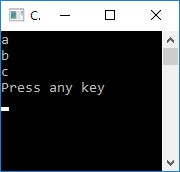
"c" is displayed also in instanceTwo.
Now to have two separate instances of IEnumerable, we need something like:
instanceTwo = instanceOne.ToList();
After that I did something like:
instanceListOne.Add("d");
Result will be still as in previous picture, "d" is not added to instanceTwo, since now we really have separate instances.
Example download from here.